
The New Agentic Governance
28 Oct 2026 · 5 min read
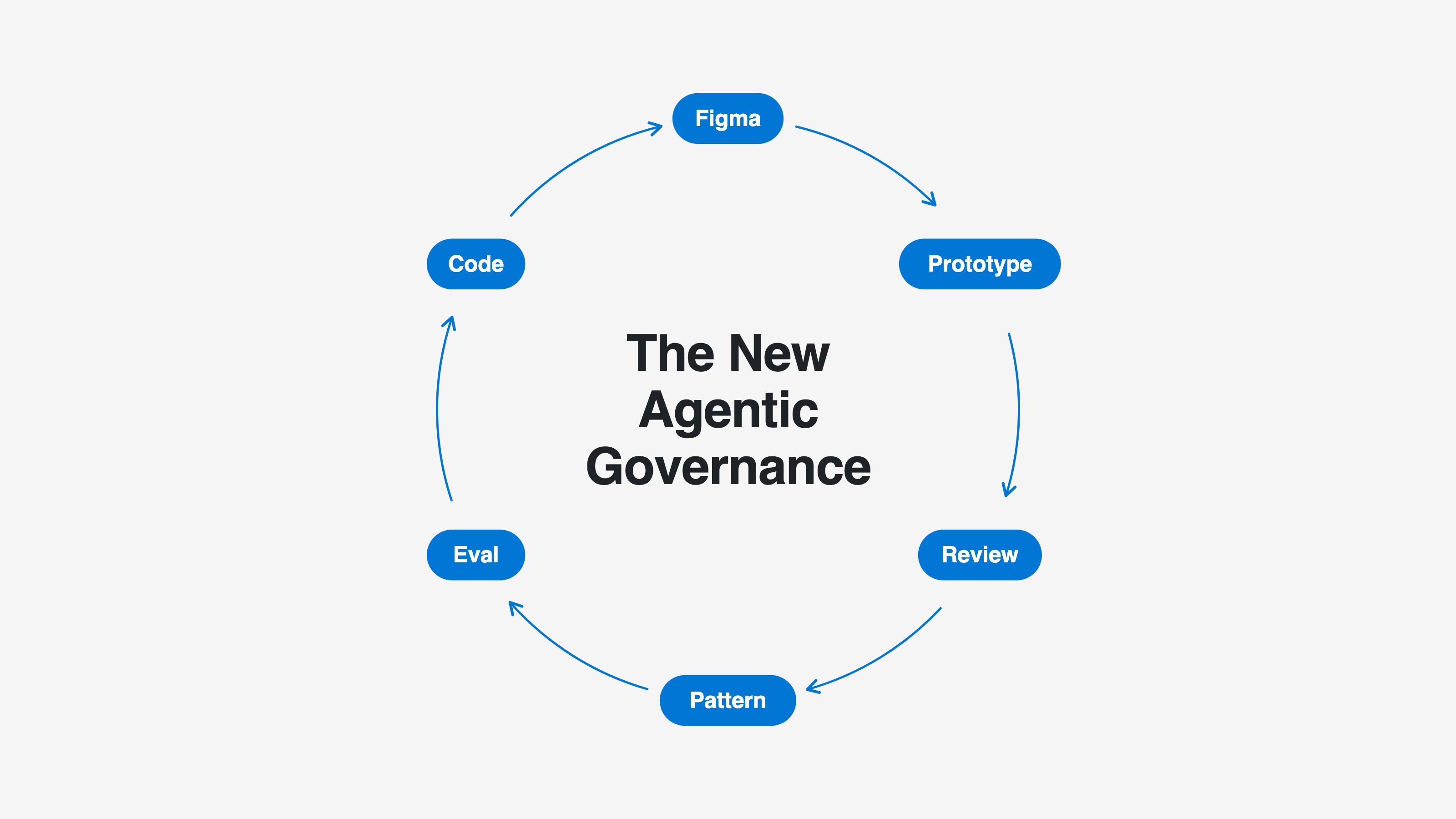
The way we work is changing very fast. More and more designers prototype and design through agents, directly in code.
And every day we validate and test faster and faster. But from the design system side, we have a big problem. It's getting harder and harder to know how people are working, and what the result is after using the DS through an agent.
We used to see the Figma files, the reviews and the questions on Slack. Now a big part of that work happens in conversations we don't see.
The governance of "before" (reviews, office hours, approving every screen) sometimes doesn't work.
So the other day, while I was going round and round on the topic of Evals, I started thinking about how to improve this workflow and came up with this idea.
The full map
Before going into each step, this is the whole journey:
- Designers upload their prototypes to a folder in the repo, each one to their own.
- An agent reviews each prototype against the design system's rules.
- The designer gets the feedback in their own PR, with the why.
- Only PRs with failures get a label, and everything is recorded.
- Whoever runs the design system looks for patterns, not screens.
- A repeated failure becomes an eval, the design system gets fixed, and you measure whether it improved.
1. A folder per designer, a PR per prototype
In the repo you create a prototypes/ folder with a subfolder per person: prototypes/ana/, prototypes/luis/… Each designer prototypes with their agent connected to GitHub and uploads the screen as a PR.
They only touch their own folder. They never touch the design system. That way they can experiment without being afraid of breaking anything, and every prototype leaves a trace.
2. An agent reviews every PR against the design system's rules
When a PR that touches prototypes/ is opened, Claude reviews it automatically against the design system's rules. For example, it checks:
- Whether it uses
Badgeinstead of a hand-painteddiv; - Whether it uses tokens instead of loose colors;
- Whether the error texts follow the component's contract.
The rules are the same ones you already have written down: contracts, props dictionary, tokens. If you don't have them yet, start there (Make Your Design System Agent-Ready in 5 Steps). Or sign up for my course Crear un design system agentic.
3. The designer learns on the spot
The agent leaves a comment on the PR with the list of failures. Each failure comes with:
- Its type (component, token, accessibility…);
- The design system file that explains it.
The designer doesn't wait for a review or for someone to have time. They see it on their own screen, with the reason and the link to understand it.
4. Only what has failures gets a label
If it finds failures, the agent adds a label, for example ds-feedback. If the PR is fine, there's no label and no noise.
And everything is recorded in GitHub: who, which screen and what failed. You don't depend on someone asking you for help, telling you what they're doing, etc.
5. Whoever runs the design system reviews patterns, not screens
You filter GitHub by ds-feedback and you only get the PRs with problems. Once a week, or whenever suits you, you look at them, group the failures by type and look for what repeats.
This scales, it doesn't matter if there are 3 designers or 30. The filter and the grouping work the same way.
6. A repeated failure becomes an eval
This is the key: not one eval per screen, but one eval per failure that repeats.
One day you see this: "In 6 PRs by 4 people, status labels were built by hand instead of using Badge." That's no longer one person's slip. It's a sign that the design system doesn't explain that point well.
- Write a task similar to those screens: "Build an orders table with the status of each one."
- Add an item to the checklist: "Uses
Badgefor the status." - Run the eval before touching anything and write down the percentage.
- Fix the rule or the documentation: the "never use for", an example, a note in the contract.
- Run it again. If it goes up, the change worked and you can prove it.
Why not one eval per screen?
- You'd have hundreds of evals that say nothing.
- An isolated failure can come from an odd brief. One that repeats tells you something about the design system.
- Evals measure your rules, not your designers.
The designer's screen is the clue and the eval is the proof.
Wrapping up
A design system's governance has always been about knowing how it's used and correcting course. With agents, that doesn't disappear, it moves: it stops being in the reviews and starts being in what comes out of each prototype.
You don't need to review every screen. It's enough that every failure is explained and recorded, and that you look at where it repeats.
How to start:
-
Create
prototypes/with a subfolder per designer. -
Write a review with the 5–10 rules you repeat most.
Start with 5 rules that work for any design system. You don't need data to choose them:
- No hand-typed values: no colors, no spacing, no radii; everything with tokens.
- If a component exists, it's used: no buttons, badges or inputs rebuilt with a
div. - Components are used the way their documentation says: correct props and error states that follow the contract.
- Names are the design system's names: props and values from the dictionary (
icon, notleftIcon;variant, nottype). - Everything is accessible: every field has its label, every icon without text has an accessible name, and contrast meets AA.
-
Make it add the
ds-feedbacklabel only when it finds failures. -
In a few weeks, turn the first repeated failure into your first eval.